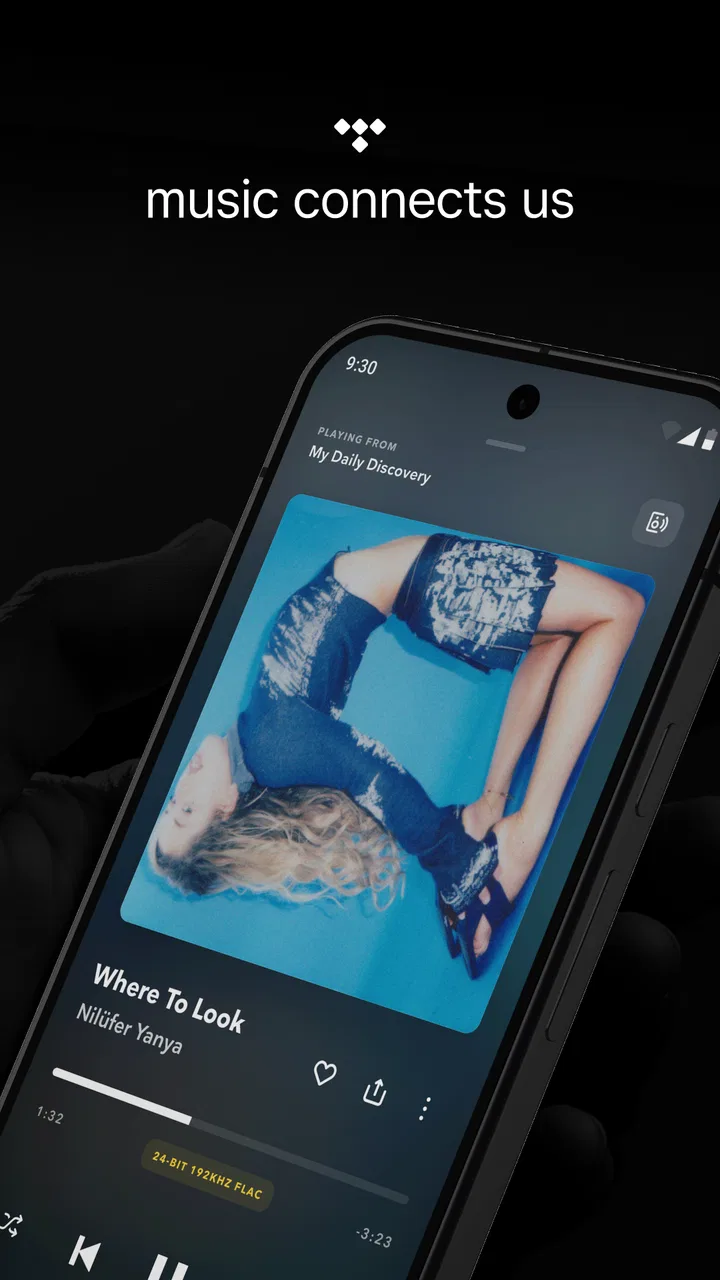
TIDAL Music: HiFi sound
- 4.4
- Rating
- 10.00M
- Installs
- Free
- Price

 Analysis by App-foxy
I spent time with TIDAL Music as a daily listening app rather than treating it as just another place to press play. It is a music and audio app from TIDAL, available free to install, with optional in-app purchases ranging from $0.99 to $35.50 per item. Its central appeal is easy to understand: a clean listening experience built around high-quality audio, offline playback, and an ad-free session. The more interesting question is whether those strengths remain useful when your needs involve reading comfort, limited dexterity, hearing differences, unreliable connectivity, or simply a busy day.
My answer is mostly positive, with an important qualification. The app feels best when you already know what you want to hear and care about uninterrupted listening. It is less convincing if you want a completely frictionless free music service, a very simple interface for occasional use, or extensive guidance for adapting the experience to a particular disability. I found plenty to like, but the quality of the experience depends on how you organize your library and how much control you want over sound and data use.
How the interface feels to read and navigate
The first thing I noticed was that TIDAL Music is easier to understand when I approach it with a specific purpose. Looking for an artist, album, or track feels more natural than wandering through endless recommendations. The app’s music-first design gives the main tasks a familiar shape: discover something, open it, save it, and return to it later. That makes it approachable for someone who already uses streaming services, while a new listener may need a little time to learn where personal listening and discovery fit together.
You May Also Like

 Blood Strike: 2.5 Anniversary
Blood Strike’s Loadouts Turn Every Drop Into a Tactical Gamble
A close look at Blood Strike’s custom loadouts: how fast access to signature weapons reshapes its battle royale rhythm, rewards preparation, and narrows the gap between fights.

 Pandora - Music & Podcasts
Pandora’s Music Is Easy to Start, but Harder to Recover
Pandora’s strength is its low-effort path from a seed to a station. Its weak spot is how much confidence it asks you to place in connection, setup, and quiet recovery.

 8 Ball Pool
 Is Built on Rivalries, Rematches, and Routine
A close look at the rivalries, rematches, shared routines, and unanswered safety questions that turn a quick pool match into a persistent mobile community.

 Samsung Music
’s Quiet Strength Is Playing What You Already Own
Its reach comes less from spectacle than from dependable access to a personal library. That simplicity is both the app’s strongest retention engine and its ceiling.

 AccuWeather: Weather Radar
AccuWeather Review: A Quick, Clear Forecast for Everyday Decisions
For everyday plans, the best forecast is the one you can understand quickly. AccuWeather makes rain timing, radar, and local conditions easy to act on, with a few trade-offs.

 Hill Climb Racing
Why Hill Climb Racing Still Turns Crashes Into One More Run
A tiny car, a bumpy hill and one more upgrade: Hill Climb Racing keeps resurfacing because its simple chaos makes every near-miss feel personal.
More From Our News Desk



For readability, the dark, album-focused presentation can be comfortable in a dim room and visually calm compared with a page crowded with text. At the same time, cover art and promotional sections can compete for attention. If you have low vision or find dense screens tiring, I would not assume that the visual design will automatically solve the problem. The practical test is whether your phone’s own text enlargement, display scaling, contrast, and screen-reader settings work comfortably with the app on your device.
I found that a carefully maintained library reduces the amount of visual searching. Instead of repeatedly scanning discovery areas, I could save albums and playlists that matched particular moments: quiet background listening, a longer journey, or music I had already downloaded. This is more than a housekeeping tip. For someone who tires quickly when navigating changing screens, building a predictable personal route through the app can make daily use much less demanding.
Search is especially valuable for users who prefer direct navigation over browsing. Typing an artist or album avoids moving through multiple recommendation rows, and it also helps when visual recognition is difficult. However, search is only as useful as the spelling and naming you enter. If you rely on voice input, unusual artist names, punctuation, or album versions may require a second attempt. I would keep a few favorite releases saved rather than depending on perfect search every time.
The app is rated for Teen audiences, which is worth remembering in a household where younger listeners share a device. That label describes the intended age context, not a promise that every song will suit every family. Parents should still decide how children use the service and whether independent browsing is appropriate. For an adult listener, the rating is unlikely to affect normal navigation, but it does matter when the app is being considered for a shared tablet or family phone.
TIDAL has also had time to mature: it was released on October 28, 2014, and it now has a substantial presence on Android. The store shows a 4.0 average from around 356 thousand ratings, with more than 10 million installs. I read those figures as evidence that the app is established rather than experimental, not as proof that every device or user will find the interface equally comfortable. Music apps can behave very differently depending on screen size, operating system settings, and the listener’s own habits.
Making everyday navigation less tiring
My most useful routine was to prepare listening before I needed it. I would choose an album or playlist while I had time, save it, and download it for a later trip or low-signal period. That turns a potentially complicated moment into a simple library action. It also helps users who find it difficult to make quick choices in public, on a crowded commute, or while managing another task.
I would also separate discovery from listening. Browsing for new music can involve more visual movement and more decisions, while playing a familiar saved collection is much more predictable. Keeping those activities distinct makes sense for anyone who experiences screen fatigue, attention difficulties, or anxiety when too many options appear at once.
One limitation is that the app’s strongest visual material is not necessarily the most useful material for every listener. Large artwork can be attractive, but it does not replace clear labels or a reliable spoken description. I would judge the app using the controls and text I can reach, not by assuming that a polished album grid equals accessible navigation.
Sound, touch, and sensory comfort
TIDAL Music is particularly appealing to people who care about audio quality. The service is designed for streaming in the highest quality available, and it supports offline listening without advertising interrupting the session. In my experience, that combination changes how I use it: I am more likely to choose an album and listen through it rather than tolerate a sequence of interruptions or settle for whatever happens to play next.
High-quality audio is not automatically better for every listener. Some people are sensitive to strong bass, bright treble, loud transitions, or a crowded mix. Others may use hearing aids, headphones with their own sound profile, or a phone speaker that emphasizes certain frequencies. I would treat the advertised quality as an option to evaluate with your own ears, not as a reason to play everything at the highest setting. A lower setting may be more comfortable and can reduce storage and data demands.
The app makes most sense for someone who knows why sound quality matters to them. If you listen casually through a small speaker in a noisy kitchen, the difference may be less noticeable than it would be with good headphones in a quiet room. In that situation, a simpler service may offer better value. If you listen closely to albums, acoustic recordings, or detailed mixes, TIDAL’s focus becomes much more meaningful.
Offline playback is one of the most practical features for people with situational access needs. I found it useful to prepare music before leaving home instead of trying to maintain a connection in a train, basement, rural area, or crowded venue. It also reduces the need to keep looking at the screen when the network is unreliable. For a listener with limited data, the important trade-off is to download deliberately and review what is stored, because high-quality files can take more space than expected.
Touch interaction deserves a realistic assessment. Music apps usually depend on tapping small controls, selecting rows, dragging through a track, and using gestures that can be easy for one person and awkward for another. TIDAL Music works well when I can make accurate taps, but I would not describe it as a hands-free experience. People with tremors, limited reach, reduced fine-motor control, or pain may prefer using their phone’s system accessibility tools, a larger device, or external playback controls where supported by their setup.
For users who cannot reliably distinguish small visual changes, playback feedback can become important. A track that looks selected, downloaded, or currently playing may not be equally obvious to everyone. I recommend checking the result by listening and by confirming the state through the available text or spoken feedback rather than relying only on color, artwork, or a subtle icon change.
Listening with different hearing needs
The app can be a good source of music for people who hear certain frequencies differently, but music quality and hearing accessibility are separate questions. A clearer recording may reveal more detail, yet it may also expose sounds that are uncomfortable. I would begin at a moderate volume, test familiar music, and adjust the phone or headphone settings that I already know work for me. The best result may come from a balanced setting rather than maximum detail.
People who depend on lyrics, captions, or visual cues should evaluate each listening situation individually. Music playback itself is the core experience, and not every listener uses songs in the same way. If understanding words is essential, I would test favorite tracks directly instead of assuming that an audio-focused service will provide every support needed for following lyrics or spoken content.
There is also a social advantage to ad-free listening. In a shared room, a sudden commercial can be startling or disruptive, especially for someone sensitive to unexpected sounds. A continuous album or prepared playlist is easier to anticipate. That said, ad-free playback does not remove every sensory challenge: transitions, mastering differences, loud intros, and the listener’s own equipment still matter.
Where it works best in real situations
A realistic example is a commuter who leaves home early, has limited mobile data, and finds crowded stations mentally exhausting. The night before, I would select a familiar playlist or album, download it, connect headphones before leaving, and use the app without depending on a stable signal. This reduces both screen time and decision-making during the journey. The trade-off is preparation: if the music was not saved in advance, the same situation becomes much less comfortable.
Another strong use case is focused work. I can choose a long album, keep the phone aside, and avoid the interruption of advertising. That is helpful for someone who works better with predictable background sound or who finds spoken announcements distracting. It is not ideal for everyone, though. If you need frequent spoken notifications, voice interaction, or rapid switching between music and other media, the listening flow may feel less seamless than a broader device ecosystem.
At home, the app suits listeners who want to explore music carefully. I can compare recordings, follow an artist’s catalog, and build a personal collection instead of treating music as disposable background noise. This is where the service feels more distinctive than a basic free player. Its value is not only that songs play; it is that the listening session can be shaped around albums, sound quality, and continuity.
For travel, offline use is again the deciding factor. I would download only what I genuinely expect to hear, especially on a phone with limited storage. A useful workflow is to keep one short emergency playlist, one longer familiar collection, and a small group of new albums. This gives me something dependable without filling the device with files I may never play. It also makes the library easier to navigate when I cannot or do not want to browse online.
People who share devices should think about privacy and predictability in practical terms. A personal music library can reveal habits, moods, or interests, and a shared tablet may present one listener’s recommendations to another. I would use separate profiles or accounts where available in the household setup and avoid assuming that a communal device will preserve everyone’s preferred experience.
How it compares with familiar alternatives
Compared with ad-supported music services, TIDAL Music feels calmer because the listening session is not built around commercial interruptions. That matters to me when I want an album to run without breaking concentration. Free alternatives may be easier for someone who accepts advertising and does not care much about audio quality, especially if keeping costs at zero is the main priority.
Compared with a basic local music player, TIDAL offers discovery and a large streaming environment rather than requiring me to own and organize every file. The local player remains better for someone who already has a carefully tagged collection, needs complete control over files, or wants playback to remain independent of a streaming account. TIDAL is the better fit when convenience and access to a broad catalog matter more than ownership.
Compared with other premium streaming apps, the decision is less about whether music can be played and more about which interface, recommendation style, device ecosystem, and sound options suit the listener. TIDAL’s strongest identity is its emphasis on high-quality listening and an ad-free experience. If your priority is family management, spoken audio, social sharing, or the smoothest integration with devices you already own, another service may be more practical.
The free price is useful for trying the app, but I would read the purchase screen carefully before committing to anything. Optional in-app items range from $0.99 to $35.50, so the word “free” should not be confused with every listening option being free of charge. I would decide first whether the app’s sound and offline benefits solve a real problem for me, then consider purchases rather than paying simply because the interface looks polished.
Remaining barriers and who should skip it
The biggest barrier is that accessibility depends partly on the phone and listening equipment around the app. System text scaling, screen reading, magnification, voice control, headphone adjustments, and hearing-device compatibility can change the experience substantially. I would test the exact combination I plan to use before relying on it for daily travel or work. A service can be well designed in general and still be awkward with one particular device or assistive setup.
Another barrier is choice overload. TIDAL Music rewards listeners who enjoy exploring artists and albums, but the same depth can make the first session feel busy. Someone who wants one large play button and almost no decisions may prefer a simpler radio-style app. I would recommend TIDAL to a person willing to spend a little time creating a dependable library, not to someone who wants the service to make every decision automatically.
Storage and connectivity are also part of the accessibility picture. Offline listening helps when networks fail, but it requires planning, free space, and enough time to prepare downloads. High-quality audio can make that planning more important. A listener with an older phone, very limited storage, or a strict data allowance may need to choose fewer downloads or use another service with lighter files.
Touch-heavy navigation can be a genuine problem for people with motor impairments. External controls may help during playback, but I would not depend on them for every library or discovery task without testing the setup. If your use depends on precise dragging, repeated small taps, or quick screen changes, the app may demand more effort than its attractive presentation suggests.
There is also a sensory trade-off in the app’s core promise. High-quality sound can be wonderful, but listeners with sound sensitivity may prefer a more controlled setup, lower volume, or a different player with stronger personal audio adjustments. TIDAL should not be chosen solely because “highest quality” sounds universally superior. Comfort, clarity, and fatigue are more important than a technical maximum.
I would skip it if I mainly want free, casual listening with minimal setup; if I already own all my music and dislike streaming libraries; or if my priority is a highly specialized accessibility workflow that must be confirmed before use. I would also look elsewhere if my household needs extensive child-oriented controls or if my music use is mostly spoken content rather than album listening.
My inclusive verdict after regular use
TIDAL Music is strongest when uninterrupted, prepared, high-quality listening matters more than absolute simplicity. I like the way offline playback can remove a stressful dependency on network coverage, and I appreciate that an ad-free session makes music easier to use in focused or sensory-sensitive situations. The app also rewards a thoughtful library, which can reduce repeated searching and make access more predictable.
Its inclusive value is more practical than explicit. I can adapt the experience through preparation, saved listening, device settings, careful volume choices, and selective downloads. Those strategies help with unreliable connectivity, visual fatigue, attention demands, and some sensory concerns. They do not erase the need for accurate touch interaction, enough storage, compatible system tools, or a willingness to organize the service.
For me, the best recommendation is conditional: try it if you care about sound quality, want music without advertising, and are comfortable preparing offline listening. Give it a fair test with your own phone, headphones, text settings, and accessibility tools rather than judging it from screenshots. If the controls are easy to reach and the sound is comfortable, it can become a dependable companion for travel, work, and deliberate album listening.
If you need the simplest possible interface, rely heavily on voice or specialized controls, or want a completely free service with no purchase decisions, the usual alternatives may fit better. TIDAL, developed by TIDAL, is not a universal answer to every listening need. In my experience, it is a focused music app whose benefits become clear when I value control over the listening environment—and whose limitations become clear when access depends on more than sound alone.
FAQs for TIDAL Music: HiFi sound
01What is TIDAL Music, and what makes it different from other music streaming services?
TIDAL Music is a premium music streaming service known for its high-fidelity sound quality and extensive music library. Unlike many other services, TIDAL offers lossless audio, ensuring that you experience music as it was intended by the artists. Additionally, it provides exclusive content, including videos, concerts, and playlists curated by artists themselves.
02Is TIDAL Music available on both Android and iOS devices?
Yes, TIDAL Music is available for download on both Android and iOS devices, ensuring you can enjoy your favorite tracks no matter your device preference. The app is regularly updated to provide users with the best possible experience, including new features and bug fixes.
03Does TIDAL offer a free version, or is it subscription-based only?
TIDAL primarily operates on a subscription model, offering two main tiers: Premium and HiFi. Both tiers provide ad-free listening, but the HiFi tier includes superior sound quality. While TIDAL occasionally offers limited-time free trials, there is no ongoing free version like some other streaming services.
04Can I download music for offline listening on TIDAL?
Yes, TIDAL allows users to download music for offline listening, making it convenient to enjoy your favorite tracks without an internet connection. This feature is particularly useful for those who travel frequently or have limited data plans. Simply download your chosen songs or albums, and access them anytime offline.
05What kind of exclusive content does TIDAL provide to its users?
TIDAL offers a wide range of exclusive content, including artist interviews, behind-the-scenes footage, and live concert streams. Users also gain access to curated playlists and albums released exclusively on TIDAL before they appear on other platforms. This makes TIDAL a popular choice for music enthusiasts seeking unique and immersive experiences.
Pros
- Exceptional audio quality for audiophiles.
- Extensive library of high-fidelity tracks.
- User-friendly and intuitive interface.
- Offline mode for uninterrupted listening.
- Exclusive content from top artists.
Cons
- Higher subscription cost compared to others.
- Offline downloads can consume storage.
- Limited integration with smart devices.
- Occasional app crashes on older models.
- Not all tracks available in HiFi quality.

TIDAL Music: HiFi sound
Gallery